Cline CLI one-shot runs now default to yolo mode: what to pin in scripts
· 4 min read · by David Vinkenroye
The short version
- Cline CLI v3.0.75 one-shot runs now use yolo mode, so tools run without approval. Pass --act or --auto-approve false, or run them in a sandbox.
- With no saved model, Cline now starts on a free model (Nemotron 3.5 Super VL is the bundled one) instead of Sonnet 5.5. Set the model in every script.
- The CLI stops reading .env and bunfig.toml from the launch directory, and file reads go from 8k to about 48k characters. Move env vars and check your spend.
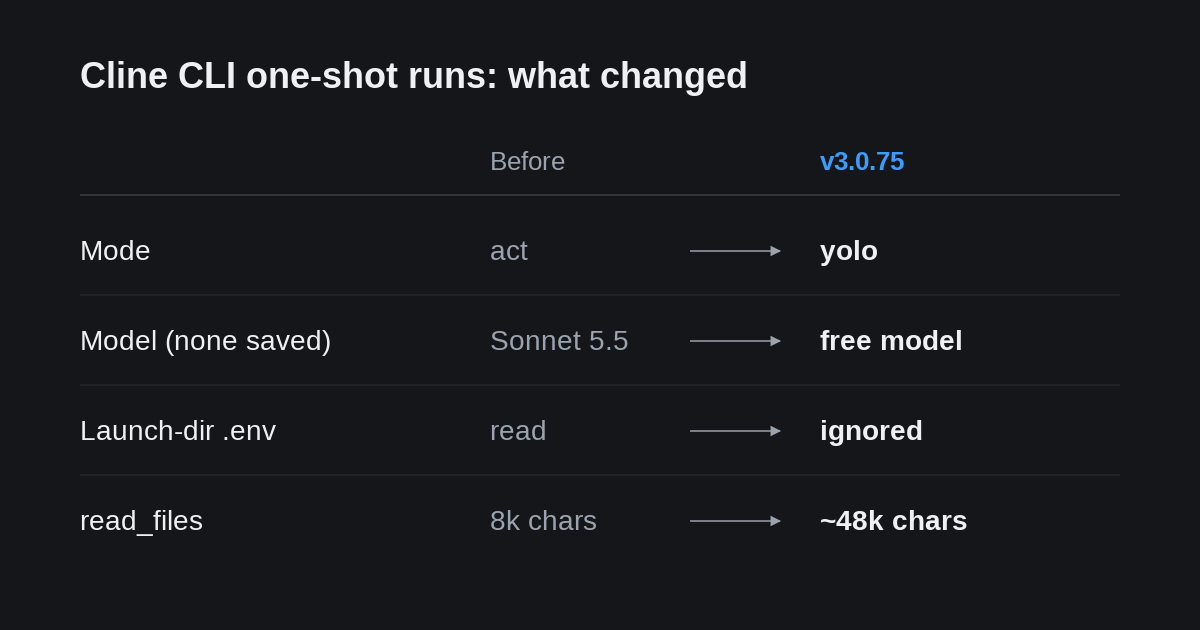
Cline CLI v3.0.75 is out, dated "21 Nov" on its release page. The page shows no year, so I'm treating it as this morning's release. The notes give the headline change one line, but it matters a lot in a cron job: one-shot runs now start in yolo mode instead of act mode. A one-shot run is any run given a prompt argument or piped stdin. The release notes give the reason: "nobody is at the keyboard to approve tools."
That's a reasonable call. It also means a script that ran cline "fix the lint errors" yesterday now runs tools without asking.
What yolo means for a script
Yolo means tools run without approval. In a coding agent, those tools edit files and run commands. The notes don't say what yolo can touch, so I would assume it can touch everything the process can.
That leaves two honest options:
- Keep yolo and fence it in: a container, a throwaway checkout, and credentials scoped so nothing valuable is exposed.
- Force act mode and accept that the run waits for approvals.
The notes don't say what act mode does when an approval prompt has nobody to answer it. Before trusting it in CI, I would try it in a throwaway run with --timeout. There's a small win here too: --timeout and Ctrl+C can now stop the first turn of a one-shot run. Before this release, neither could.
Getting act mode back
The notes list four ways back to act mode:
- auto-approve turned off, either with
--auto-approve falseor through the saved setting - any mode flag
- plan mode saved
- a
/teamprompt
The saved settings are the trap. The same script can behave differently on two machines depending on what someone clicked months ago. In scripts I would pass the flag every time:
cline --act "update the changelog"
# or
cline --auto-approve false "update the changelog"
One more thing: yolo mode has no team tools. The notes say to "pass --act when you need them."
The model nobody picked
If no model is saved, the Cline provider now starts on the first free model instead of Claude Sonnet 5.5. The CLI, extension v4.1.27 and Desktop v0.0.50 notes all say so. Saved selections are left alone.
The SDK v0.2.1 notes give the lookup order. It's the first free model from the live recommended feed, then the bundled free model, then CLINE_DEFAULT_MODEL_ID, which is now anthropic/claude-sonnet-5.5. The free list dropped Reflection Beam, Laguna S 2.1 and Solar Mini 4, so the bundled default is now Nemotron 3.5 Super VL.
A fresh CI runner has no saved model. Put that together with yolo and you get a model you never picked, running tools unattended. Output quality, rate limits and data handling may all differ from what you assumed. Set the model explicitly. While you're at it, /account now links to the data-use preferences in the Cline web app.
The .env that went quiet
"The CLI no longer reads .env or bunfig.toml from the directory it is launched in." If your API keys or CLINE_* variables lived in a .env in the repo, the CLI can't see them anymore. I doubt the error will mention .env. My guess is it shows up as an auth error, or as a quiet fallback to the free model. Export those variables from the shell or from CI secrets instead.
Bigger reads, bigger bills
read_files results are no longer cut to 8k characters on the way to the model. In the CLI, extension and Desktop, a read now arrives in full, up to the tool's own limit of 2000 lines or about 48k characters. The 50k number you may see belongs to the SDK's file-content cap. Command, search, MCP and custom tool results keep the 8k cap.
Full files give the model better context. They also mean up to six times more tokens per read, so the context window fills faster and compaction starts sooner. Check your token spend for a few days after upgrading.
My Monday list
- Grep scripts for
clinecalls that take a prompt or piped input. Add--actor--auto-approve false, or move them into a sandbox. - Set the model explicitly in every script.
- Move variables from repo
.envfiles into the real environment. - Add
--timeoutto unattended runs. - Watch token usage after the
read_fileschange.
None of this is hidden. It's spread across four release pages, all dated the same morning. The interactive users will spot the new defaults straight away. The scripts are the ones that will hit them without anyone watching.
Sources
- CLI v3.0.75, Cline releases
- v4.1.27, Cline releases
- SDK v0.2.1, Cline releases
- Desktop v0.0.50, Cline releases
One email per post, confirmed by you, gone with one click. Privacy