
Kairo
My private AI assistant: my WhatsApp, my health and my day, on my iPhone and by voice.
Built by David Vinkenroye in Geneva.
Filmed in the iPhone simulator with made-up people, chats and meals.
How it fits together
The story
It all started at the beginning of 2026, when I set up OpenClaw and had an AI agent doing real things for me for the first time. I wanted more of that, so I built my own assistant around Garry Tan's GBrain, and the two grew up together: the brain into Dbrain, my own memory, and the assistant into Kairo.
I made Kairo for myself first, with nothing held back: both my WhatsApp accounts living inside it, my meals and my watch, my mail and calendar, and a voice I can talk to with the phone in my pocket. Once it worked for me, I thought other people might want one too. That became Neonduck, the careful public version, while Kairo stays the one built for an audience of one.
It runs on my own Claude subscription, on a server in my flat, right next to Dbrain. Before it answers it looks things up there, and it files what it learns back. And before anything that sends, deletes, pays or calls, it asks me.
WhatsApp is the part I use most. I was sick of iPhone dictation mangling my messages, so now I talk and Kairo writes what I meant.
In November it got a name and a look of its own, Kairo: a drop of glass as the logo, an iPhone app of its own, an orb that breathes while we talk, and an icon set made just for it. It lives on my phone and at home, not in the App Store.
Everything it does
Talking to it
- Chat
Every chat can look things up, use my tools and keep going until the job is done. Answers can come back as more than text: a day drawn on an hour timeline, cards, charts, a shopping basket, a form to fill in. I can attach photos and files, and group chats into projects that share their own instructions and files.
- Voice
A tap on the orb and we talk, and it can check my calendar or write a message mid-sentence. On the iPhone a talk is a real phone call: it keeps going with the screen locked, in my pocket, it sits in the Dynamic Island, I end it from my AirPods, and another call puts it on hold.
There is one voice everywhere: the voice I pick is the one that talks with me, reads my WhatsApp messages and reads the paper, at the speed I set.
It works the other way round too. Kairo can ring me with the morning briefing, and an alarm can wake me straight into it: I tap Brief me and it starts talking.
- Pictures
I can sketch something on a full-screen sheet or just describe it, and Kairo turns it into a picture. It can also restyle a photo I attach.
My day
- Home
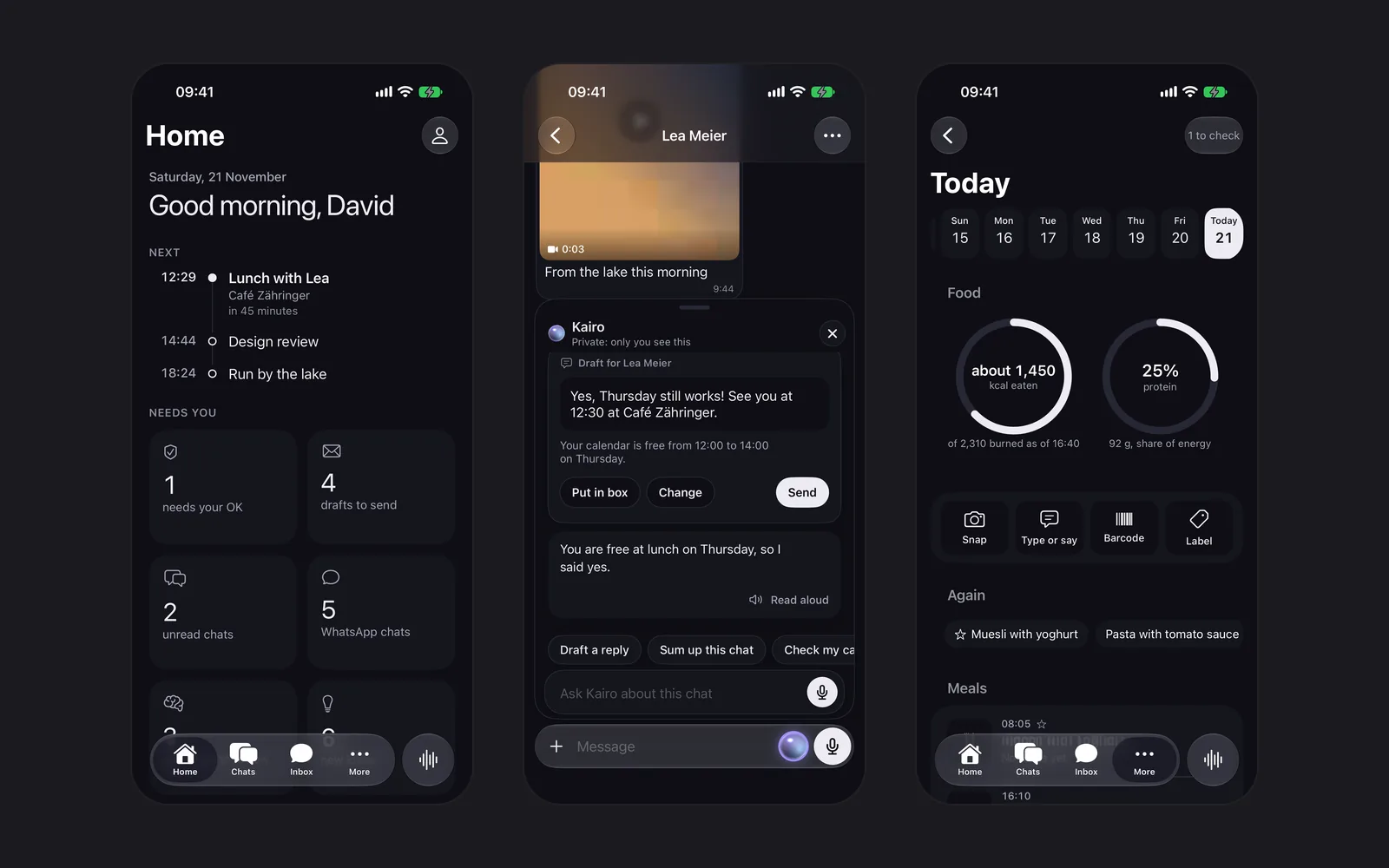
The first screen: a greeting, today's events, what is waiting on me and a button to the briefing. Nothing to dig for.
- Briefings
A morning and an evening briefing, at the times I choose. Each one draws the day as a board: the hours with my events and the free gaps, the weather, and short lists like Needs you, Birthdays and Coming due. Every item has a button that does something about it, like Draft reply or Send wish, and tapping it is the go-ahead.
Before each meeting with other people, a short brief arrives: who they are, how long we have been in touch, what was said last time and what matters now. On Sundays I get Sunday Wrapped, my week as a short story with real numbers: kilometres run, loops closed, people seen, one thing that slipped.
- The Kairo paper
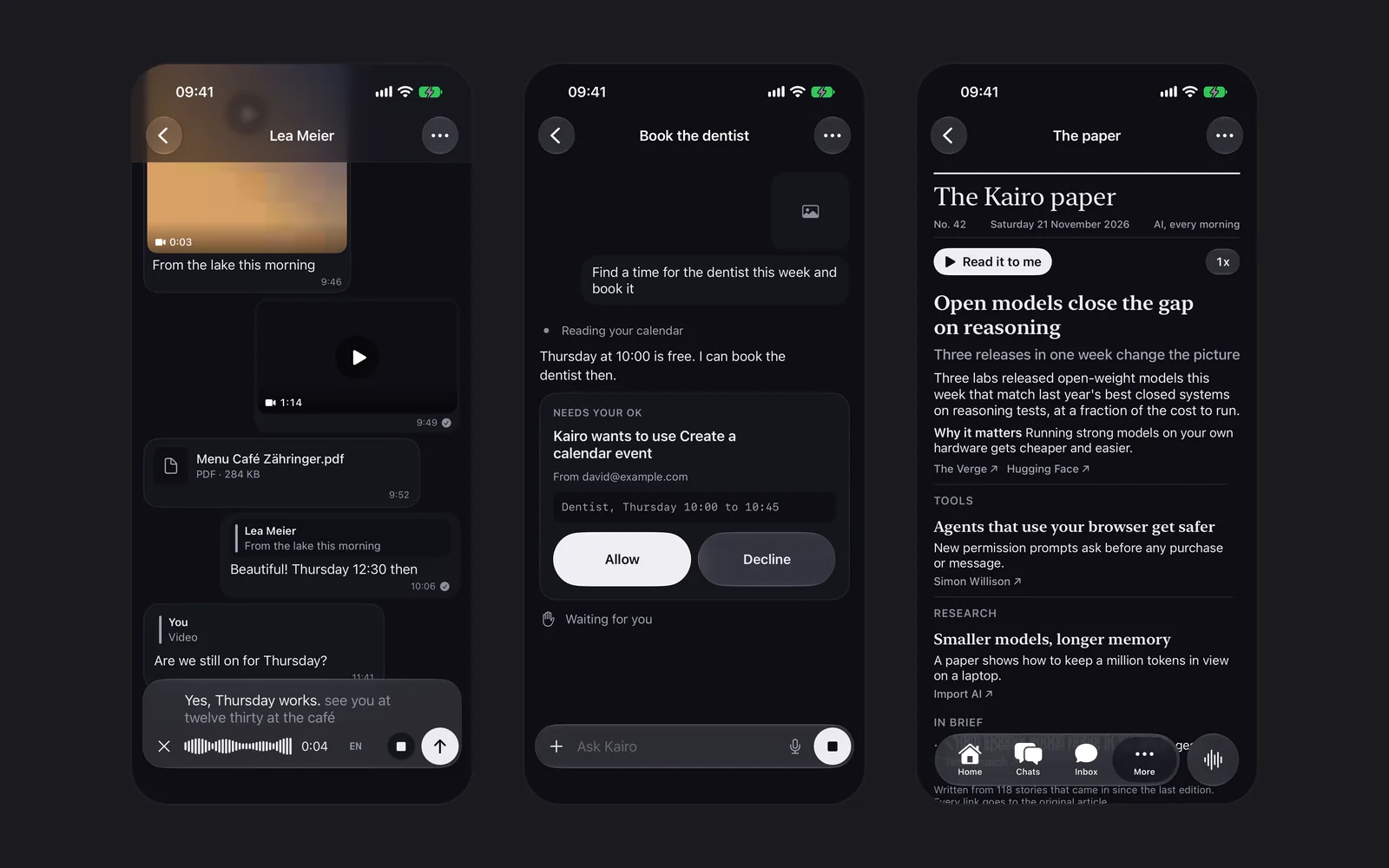
A morning paper about AI. Kairo gathers the news feeds itself, Claude picks and writes the stories in one go without browsing, and every link is filled in from the feeds, so no link is ever made up. It can read the paper aloud while I make coffee.
- Days
A scroll through my days. A past day becomes a day file, rebuilt from my own records: what was in the calendar, who I met or messaged, steps, sleep and workouts, how many photos I took and where, and what happened on the same date in earlier years. Coming days show as boards.
Getting things done
- Ideas
Every morning at 06:30 Kairo reads my calendar for the week, my mail and messages and Dbrain, and comes back with six to nine concrete things it could do for me now, each tied to a real person, meeting or deadline: "Draft your reply about Thursday", "Book the table for Saturday". Before it suggests a reply it checks my sent folders, so it never offers to answer someone I already answered. One tap and it does it; one tap on the cross and that idea never comes back.
- Drafts
My email drafts, from every mailbox, as a deck of cards I swipe through one at a time: right to send, left to bin, up to fix, down for later. To fix one I just say what to change, and Kairo rewrites it in the mailbox itself.
"Write replies" goes further. Kairo looks for the mail from the last two weeks where a real person is waiting on me, with the same check of my sent folders, and writes up to eight replies as drafts in the right mailbox and thread, in the language of the thread and the way I write. Where only I know the answer, it leaves a marked gap instead of guessing. And every correction I make is written down as a lesson about how I write, which it reads before the next round.
- Goals
My goals, by area: health, work, friends, learning, money. Kairo suggests new ones from what it sees, which I can accept or turn down, and checks on progress. A goal nobody touches for weeks gets paused, a finished one gets archived, and now and then it asks whether I still want one.
- Autopilot
Standing orders in my own words, on a schedule: "every Friday at 16:00, tell me which invoices are still open". Each routine has its own thread where it reports every run, and I can reply there to change it. A routine runs while I am not looking, so I choose exactly which tools it may use.
- Browser, calls and payments
Kairo has its own browser for the sites without an API. I can watch it work live and take over at any moment. It can phone a restaurant or a doctor's office from my number after one approval and posts the outcome back in the chat. Saved logins and my card are encrypted, and Kairo fills them into a form without the model ever seeing them.
Remembering
- Memory
Everything Kairo remembers lives in Dbrain, and the Memory page shows it in three kinds: facts, skills and reminders.
Facts come in two ways. When I tell it something in a chat, "remember that Lea is vegetarian", it saves it straight to Dbrain and the fact shows up in the log. And every evening at 21:30 Kairo reviews the day's conversations by itself and proposes up to six things worth keeping for good: a preference, a decision, a fact about someone, a promise with a date. It checks Dbrain first and leaves out what is already there. Nothing it proposes is saved until I tap Keep, and what I turn down is never proposed again.
A skill is my way of doing a kind of request. When I ask for the same sort of thing twice, or tell it how I want something done, the evening review can propose it as a skill: a name, when it applies and the steps. Once I say Use this, it follows those steps every time. A reminder is a note for later: "when the landlord comes up, remind me about the heating". It waits for the topic and speaks up when it does.
My conversations go into Dbrain too, word for word. Once a chat goes quiet it is written out as a file, and Dbrain files it with no model in between, so what I said is kept exactly as I said it. The notes of my meetings are filed the same way each evening, so a brief before the next meeting can find them.
- Contacts
Dbrain keeps my iPhone contacts up to date. Once a day it adds the people I am really in touch with, both ways, from mail and WhatsApp. Anyone it is unsure about waits for me on a short review page: an email address with no name, a name that matches a card I already have but no number. One card per person, and I either add them, typing the name where one is missing, or skip them for good.
- Saved for later
One library for every link I want to come back to, filled from my iPhone, a bookmarklet on my Mac and Kairo itself. Each save is summarised and filed in Dbrain, so Kairo can find it again when it matters.
Messages and health
My personal and my business WhatsApp live inside Kairo: every chat and group, photos, videos, voice notes with transcripts, replies and reactions. It behaves like the WhatsApp I know. I hold the mic for a voice note, slide away to cancel or up to lock it, and swipe a message to reply to it. Opening a chat reads it, blue ticks included, and I can mute a chat in Kairo without touching WhatsApp. The chat list works the same way: All, Unread, Favourites and Groups sit right under the search field, my WhatsApp favourites in their own order, and a community is one row that opens onto its groups.
Dictation works like in the Claude app: the words appear while I speak, and X throws them away, Stop leaves them in the box and Send sends. Kairo works out the chat's language from its messages and shows it as a small tag I can tap to switch. When I stop, it tidies the words into the message I meant, in the way I write in that chat. And when someone wrote last, up to three short replies sit above the box; a tap puts one in, it never sends.
It can read my messages to me too. With AirPods in, a new message is spoken in Kairo's voice as the notification itself: "Anna says: running ten minutes late". Otherwise there is Play on the notification, or "Read my messages" for every unread chat in a row, and I can answer by voice.
- Kairo in a chat
Next to the mic in every WhatsApp chat sits Kairo's glass button. A tap opens a private panel that only I see, and there I can ask it to draft a reply, sum up the chat, check my calendar before I say yes to Saturday, translate, or anything else. It knows the chat it is in, who said what and in which language, and it has just what a chat needs: my calendar, contacts, Dbrain, the web and reminders, which keeps it quick.
A draft comes back as a card with three buttons: Put in box, Send, or Change, where I just say what to change. Kairo never sends a message by itself. Each time I open the panel it starts from a clean slate, and it gets ready the moment it opens, so my first question never waits for it to start. And if I hold the button instead of tapping, I ask out loud and hear the answer read back.
- Health
I log a meal with a photo or a sentence, and on the phone the camera reads a barcode or a nutrition label by itself. Kairo names the foods and guesses the grams, and if it can't tell whether something was fried in oil or butter, it asks. The calories and protein come from real nutrition tables, never from the model. Next to what I ate sit the calories I burned, steps, sleep and weight, and a week of all of it side by side.
On the phone, the watch and the Lock Screen
- The iPhone app
Every page is a native screen, and it opens instantly on what it showed last time while the fresh copy loads behind. Face ID when it opens, a passkey to sign in.
- Lock Screen
When Kairo works on something long, or I am on a call with it, the progress sits on the Lock Screen and in the Dynamic Island, and on my watch, the CarPlay dashboard and the Mac menu bar too. When it needs my OK to send something, Allow is right there: Face ID, done, without opening the app.
- Notifications
Only the things that matter make a sound: approvals, replies, WhatsApp, calls and briefings. A WhatsApp message says who wrote and on which account. On top of that come Kairo notices, a few a day at most, outside quiet hours: a meeting that moved, a mail someone is waiting on, a train to catch, a workout, arriving somewhere. Each one ends with a line saying why I am seeing it.
Housekeeping stays silent. The badge counts what is really waiting on me, and when I read or handle something anywhere, on the Mac, the phone or the watch, its notification clears itself everywhere. A Test notifications button in Settings sends me one of every kind, so I can check them all in a minute.
- Buttons and Siri
Widgets for today, what needs me and health. Controls I can put on the Action button, like Talk to Kairo or Read my messages. Siri phrases, chats in Spotlight, and a Focus filter that switches Kairo to Personal or Business with my Focus. And "Kairo" sits in the share sheet of every app: I send a link, some text or photos to ask about, and the answer comes back as a notification without opening the app, or I save a link for later in one tap.
- Apple Watch
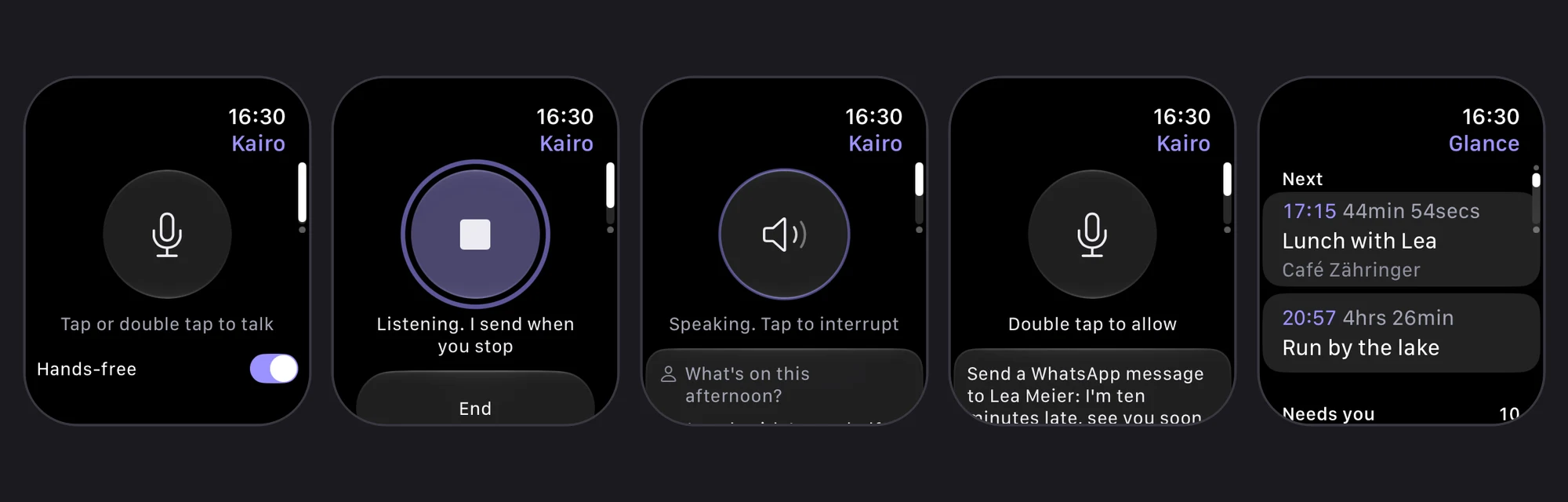
A small app of its own on my Apple Watch Ultra. It talks to my server over its own connection, so it works on a run with the phone at home.
One tap starts a conversation, hands-free: the watch hears when I stop talking, Kairo answers out loud and listens again, until I stay quiet. When I run, cycle or walk, it keeps its answers to a sentence or two.
When Kairo needs my go-ahead, say to send a WhatsApp reply I dictated, it tells me, and a double tap of thumb and finger allows it. My voice alone never approves anything. There is also a glance at my day, complications, and Talk on the Action button.
- In the car
Kairo is a CarPlay voice app. I tap it on the car's screen and we are talking: the same voice as on the phone, with my calendar, mail and messages, and answers kept short because I am driving. The screen shows only the drop of glass and one word for what it is doing, listening, thinking or speaking, with Mute and End, because Apple allows no text or pictures in the car. What we said ends up as a chat I can read later.
Around it all
- Two spaces
Personal and Business, with one switch at the top. Each space has its own mailboxes, WhatsApp account, chats, drafts, goals and memories.
- Undo
A deleted chat, memory or routine can be brought back for five seconds.
- Small jobs
The real thinking stays on Claude. The small, quick jobs go to a fast model instead: tidying a dictation, reply suggestions, the short spoken summaries for the watch, Siri and the Lock Screen, read-aloud text that sounds natural, chat titles, and a yes or no on whether something deserves a notice. Answers come back in about half a second.
How I set it up
The brain
Every chat is one live Claude session through the Claude Agent SDK, on my own Claude subscription, so it works the way Claude Code does: it plans, uses tools and reads files by itself. Sonnet does the everyday work, and I can switch a chat to Opus when it needs more thought. A subscription login is only for its owner, which is exactly why Kairo stays a tool for one person and Neonduck is the version for other people.
It gets its tools from three places: Dbrain, straight over MCP on the home network; the connectors on my Claude account for mail, calendar and documents; and a set of its own, for pictures, phone calls, goals and the day board.
Where it runs
One Docker container on the NAS in my flat, a Node.js server with no build step, and one SQLite file that holds every chat, meal and goal. The outside world only reaches it through a Cloudflare tunnel with a login. One deploy script ships a new version and checks that it came up, and the database goes into Dbrain's backup every night, where a restore is tested every week.
Asking before it acts
Reading is free. Changing something shows an approval card, which I can allow once, for one chat or for good. Anything that sends, deletes, pays or calls asks every single time: I can never tick "always allow" for those. Jobs that run while I sleep, like the morning briefing, may only read. An approval also arrives as a time-sensitive notification, and it still needs a tap, voice or no voice.
The two spaces are a wall in the server. Every chat, draft and memory belongs to one side, and every tool call is checked against the chat's own side before it runs, so a business mail can't go out from my personal account.
Two small bridges run next to Kairo on the same server, one for my personal number and one for WhatsApp Business. Kairo reads their chats and gets every new message the moment it arrives, which is what keeps the page live. Opening a chat marks it read on WhatsApp itself, and so do messages that arrive while it is open.
For dictation, the app streams my voice as small audio frames over a WebSocket to Kairo, which relays them to OpenAI's realtime transcription, so the OpenAI key never leaves my server. Before it starts, Kairo reads the chat's recent messages and, when one language clearly leads, tells the transcriber to expect it; otherwise OpenAI detects it. As soon as the words settle, they go to the fast model for the tidy.
Kairo in a chat is an ordinary Kairo session, one per WhatsApp chat, titled after it and kept in the right space. Each question goes in with the chat's last 40 messages, its name, whether it is a group and its language, but only my question is saved in the record. That session gets one extra tool, whatsapp_draft, which shows the draft as a card in the panel, and its WhatsApp sending tools are switched off, so the only way a message leaves is my tap on Send. Any other tool that reaches people still asks first. The session stays silent: no notifications, no unread marks, no Live Activity. Opening the panel already starts that session on the server, which saves about a second on the first question.
Notifications
Notifications go to the iPhone through Apple's push service, and to the web app as web push. A notification service extension on the phone turns a message into a proper conversation notification with the sender's picture, and with AirPods in it swaps the sound for the spoken message, in Kairo's OpenAI voice. A content extension adds the Play button. Messages that arrive together in one chat become one notification, and muted chats, my own messages and the chat I'm reading stay quiet.
Clearing is a silent push, gathered over a second or two, that sets the badge and removes the notifications that no longer matter. The test button calls a route that sends one sample of every kind to the phone that asked, Live Activity included.
Voice
Voice mode is a realtime model doing the talking, OpenAI or Gemini Live, and handing every real question to the chat's Claude session. In the iPhone app the call runs natively over WebRTC, and LiveCommunicationKit makes it a real call to the phone, which is what keeps it going with the screen locked. For the briefing, Kairo sends a VoIP push that rings like a call, and AlarmKit does the waking.
The watch can't hold a WebRTC call for long, so it does push-to-talk instead: it records a short clip, sends it over plain HTTPS, and plays back Kairo's spoken answer.
In the car, Kairo uses Apple's CarPlay category for voice conversation apps: a single Voice Control screen that follows the same call's state, with no text, no pictures and no system call screen on top of it.
The orb you talk to is a drop of glass rendered live: Metal in the app, WebGL in the browser, at 60 frames a second, moving with my voice and with Kairo's.
Small jobs on a fast model
Anything small without tools goes to one cheap, fast OpenAI model, gpt-6-luna, with reasoning switched off, a small answer limit, strict JSON where a job needs fields and nothing stored on OpenAI's side. While Kairo is in use, the server keeps one warm keep-alive connection to OpenAI open, and the jobs I sit waiting for go out on the priority tier. The whole thing costs cents a day.
Every job has a hard time limit and its own fallback when the model is slow or down: the first sentences instead of a summary, the words as spoken instead of a tidy, no suggestions at all. Only timings go in the log, never content.
Health
Claude only names the foods and guesses the grams; every calorie and macro then comes from the Swiss Food Composition Database or, for anything with a barcode, Open Food Facts. Steps, sleep, weight and calories burned come from my watch and my phone, through HealthKit with background delivery and services in Dbrain, and runs from Strava.
The iPhone app
A SwiftUI app in Apple's Liquid Glass. Every screen reads the same JSON routes as the web app, so the logic stays on the server and a new server version changes the app at once. What a screen showed last sits in a disk cache. Each device signs in with its own token in the Keychain.
Around the app sit its extensions: the share sheet, widgets and Controls, Live Activities, the two notification extensions, and the Apple Watch app with its complications. They share the device token through the Keychain and a small App Group for the spoken notification sounds. Since my developer account went paid, an install lasts a year. I still install it on my own phone from Xcode, so it never went near the App Store.
Housekeeping
Kairo cleans up after itself once a day. Morning and evening briefings go after a week, the morning paper and meeting briefs after two weeks, the weekly wrap after a month, and empty chats after a day. My own conversations, memories, goals and meals are never touched.
Kairo is for me alone and private, so there is nothing to link to.
WhatsApp in Kairo
Filmed in the iPhone simulator with made-up people and chats. Nothing is sent until I tap Send.
Screens
A local copy with made-up people, chats and meals.
What was built
- Both my WhatsApp accounts, live inside the app
- Dictation that writes the message I meant; nothing goes out until I tap Send
- Kairo inside every WhatsApp chat, in a private panel
- Messages read aloud in my AirPods
- Voice as a real phone call, with the screen locked
- Kairo in the car, by voice through CarPlay
- A native iPhone app, and an Apple Watch app I talk to hands-free, even with the phone at home
- Approvals on the Lock Screen, with Face ID
- Meals from a photo, with numbers from real nutrition tables
- Two spaces, Personal and Business, with a wall between them
- Briefings morning and evening, a morning AI paper and a brief before each meeting
- Its own browser I can take over, and phone calls from my number
- A daily clean-up of what it writes on its own
Stack
- Node.js (plain ESM)
- Claude Agent SDK
- SQLite
- Playwright
- OpenAI realtime voice (WebRTC)
- OpenAI realtime transcription
- Gemini Live
- Swift and SwiftUI
- watchOS
- APNs
- Metal
- WebKit
- Web Push
- Docker
- Synology NAS
- Cloudflare Tunnel
- MCP
Themes
AI agents
I build agents that do real work: answer mail, make a phone call, drive a camera, sort a photo library or run a whole build. I use whichever models fit the job: Claude, OpenAI, Gemini, open models and plenty of plain code.
Ask before acting
For actions like sending, paying, deleting or taking a photo, my apps wait for a tap from the user. When the AI changes something, you see the change and the reason for it, and where I can, there's an Undo button.
Self-hosting and data sovereignty
My own data stays on a NAS at home, behind a tunnel. Each Neonduck customer gets their own isolated server, and if they delete the account, the server is deleted too.
MCP and tool use
I use the Model Context Protocol to connect AI assistants to real things: a camera, a photo library, my own archive and Haystack OS, my recruiting tool. I keep most servers small and read-only where that matters, and where an assistant can write, its token is scoped to what it needs.
Connected work
- Neonduck grew out of Kairo.
- Kairo remembers through Dbrain.
- LightboxAI photo sorting for a self-hosted library, with keep scores and duplicate stacks.
- Haystack OSThe lean ATS and CRM I run my recruitment agency on, with Claude doing the reading and the drafting.
- LodestarAn iPhone and iPad app that sets up a Sony camera from one sentence and takes the shot.